
Work Order Connector with authentication
Field users are redirected to the full work order page.
The Work Order Connector has been designed to redirect users at the work order level in the Deepomatic application. With this connector, user flow follows the following steps:
Users open a work order (or equivalent) page in their field application.
By clicking on a button, they are redirected to the Deepomatic interface, on the corresponding work order page.
Users can then be guided in taking the expected photo, take the photo, view the analysis results and report any issue.
Once they are done, they finally return to the original field application to continue their journey.
The three sections below describe the technical steps and options to create this experience.
Creating work orders
In order to send users to a work order page in the Deepomatic application, a work order must have been created in our systems.
Work orders must be created in advance, for example during work order planning. To do this, it is necessary to use the endpoint for creating a work order, which is described here.
The work order id will be used to redirect the users to the right work order page in Deepomatic. This id is returned in the work order creation API response and should therefore be saved.
Sending the users to the Deepomatic interface
When the work order has already been created, the following URL should be used to send the user to the Deepomatic interface:
https://studio.deepomatic.com/field/connector/work_order/{work-order-id}?site_id={site_id}&org_slug={org_slug}&callback_uri={callback_uri}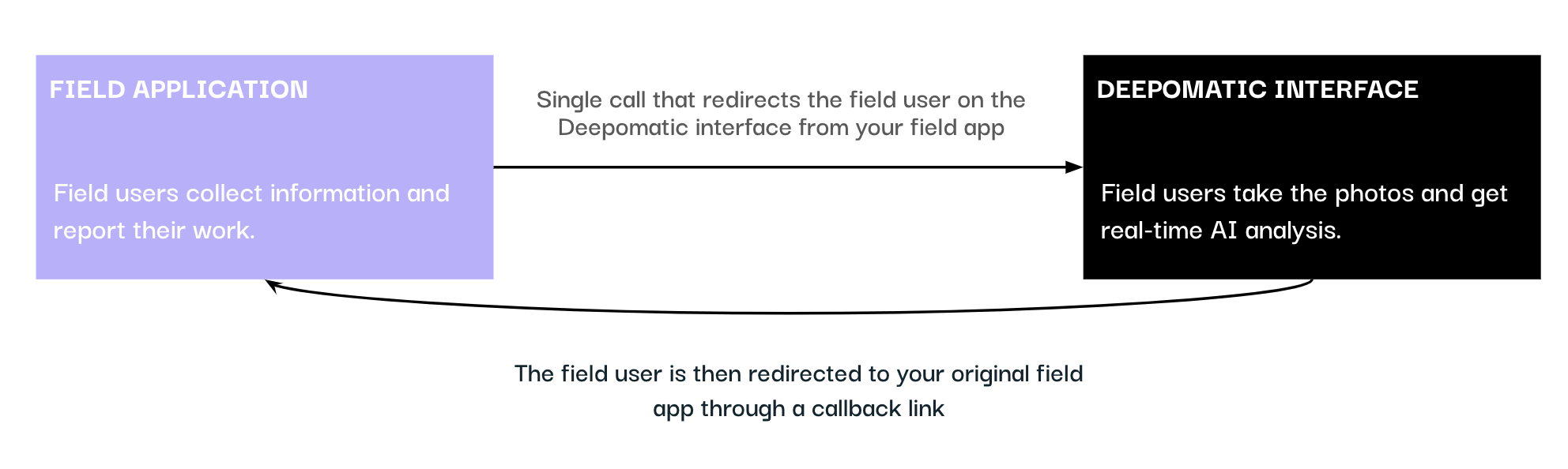
Mandatory query parameters must be added:
site_id (UUID) - unique identifier for the site you are trying to reach. Will change between testing and production site.
org_slug (slug) - slug name of the organisation where your site is deployed
callback_uri (URI) - URI where the users will be redirected after leaving Deepomatic interface.
Two precisions on the callback URI :
Any query parameter included in the callback URI that bears the same name as a Deepomatic query parameter will be ignored to avoid conflicts in the callback redirection.
The callback URI sent through the query parameters should be encoded to avoid conflicts between special characters.
Retrieving data generated by Deepomatic
At the work order level, we compute a progress score based on the different analyses carried out.
On your field application, we recommend to put in place a logic for closing the intervention based on the work_order_progress (eg. if the progress is below a certain threshold, the users cannot close their intervention).
The work_order_progress (integer, between 0 and 100) is directly returned with the callback URL.
In order to retrieve the images and the complete analyses of a specific work order, you will need to use the endpoint to get a work order described here.
Last updated
Was this helpful?